Download Inkwell
for Windows.
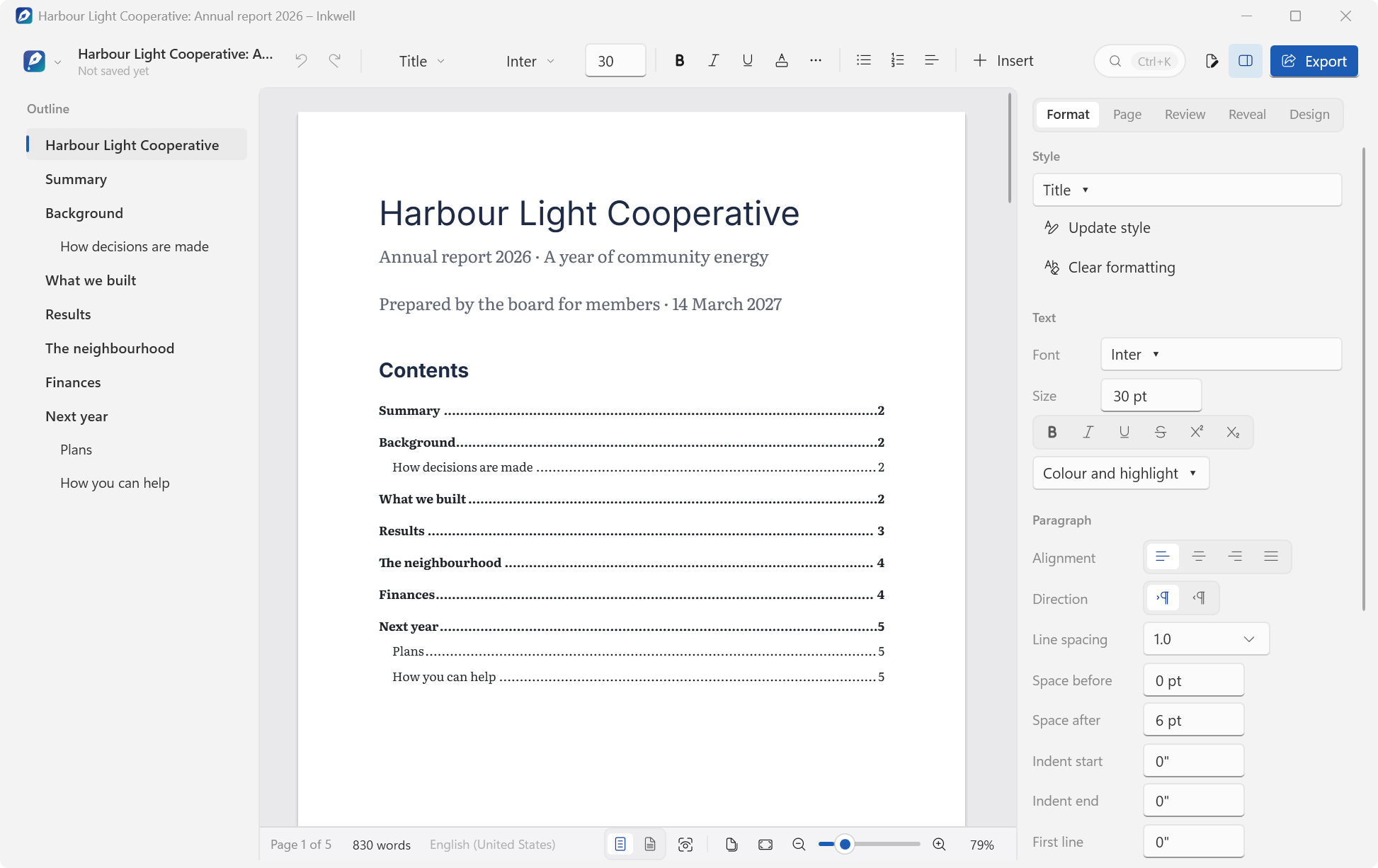
A free word processor for Windows with a Windows 11 look and no ribbon. It opens and saves Word documents (.docx) and keeps what it doesn't edit, fixes the things that make word processors frustrating, writes Urdu and Arabic right to left, and exports PDF.
VERSION 1.0.1RELEASED FREE
Other Windows versions and checksumsWindows 7 SP1, 8.1, 10 & 11 · x64, ARM64 and 32-bit
The engine (.docx, layout, editing, formats, PDF, citations) and the app's shortcuts and settings, on .NET 10 and .NET Framework 4.8
Values Word counted the same as Inkwell (pages, words, tables, pictures, notes and more) in 9 documents
Every installer.
Pick yours.
| Windows | Best for | Size | Installer |
|---|---|---|---|
| Windows 10 & 11 · 64-bit | Intel or AMD processor. Most PCs. Self-contained. Nothing else to install. | 49.0 MB | Download |
| Windows 11 & 10 on ARM | Snapdragon laptops, Surface Pro X and other ARM PCs. Self-contained. Nothing else to install. | 43.6 MB | Download |
| Windows 10 · 32-bit | Older PCs running a 32-bit installation of Windows 10. Self-contained. Nothing else to install. | 45.1 MB | Download |
| Windows 7 SP1 & 8.1 | Older PCs, 32- or 64-bit. Uses Microsoft .NET Framework 4.8 (setup tells you if it is missing). | 7.0 MB | Download |
SHA-256 checksums
- Inkwell-Setup-1.0.1-x64.exe
19c10a70fe126e056504829e31eb1f1570410e872ee830514970cda96e62a46d - Inkwell-Setup-1.0.1-arm64.exe
930722d616be18d1a73d0f1bb68023503109a84164ff848dfb022297df9f601d - Inkwell-Setup-1.0.1-x86.exe
df33bac61ac3a5f25985f5c886ed5ccee9bc08e9adc8222a626b3de6b118999e - Inkwell-Setup-1.0.1-win7-8.exe
a866027a5b26f49841c7f88e2212dd00d28eba8528e7b162b17603c39cc31288
Which one do I need?
Open Settings › System › About on Windows 10 or 11, or Control Panel › System on Windows 7 and 8.1. It shows your Windows edition and system type. Most PCs need the first installer. Windows 8 needs the free update to 8.1 first. Windows XP and Vista aren't supported.
What's new
in 1.0.1.
Inkwell 1.0.1 came out on the same day as 1.0.0, with a round of fixes. If you have 1.0.0, it offers the update by itself (unless you switched the update check off). One last time, a 1.0.0 installed in a folder of your own sends you to this page for the installer; from 1.0.1 on, those installations update in place too.
- 01
Updates in any folder
The updater now recognises Inkwell wherever its installer put it, so an installation in a folder of your own updates in place too.
- 02
One key per command
Ctrl+Shift+E turns track changes on and off, as in Word; Export moves to Ctrl+Shift+X, and Alt+F opens the menu. Menus, tooltips and the palette show the keys as your keyboard layout names them.
- 03
Every autocorrect rule in Settings
Settings › Autocorrect lists every rule, the Markdown shortcuts too, so a rule you stopped from the chip can be turned back on. A correction made as you press Enter now shows its chip and is undone by one Ctrl+Z.
- 04
A command bar that fits
On narrower windows the command bar shortens in whole steps (the search box becomes Search, then its icon) instead of cutting labels off.
- 05
Smaller fixes
“Start at…” on the right-click menu and in the palette; .docm documents save automatically too; version history follows a new size limit straight away; messages close when you change view.
What it
runs on.
- Windows 10 & 11
- x64 or ARM64, plus 32-bit Windows 10. Self-contained: nothing else to install.
- Windows 7 SP1 & 8.1
- 32- or 64-bit. Uses Microsoft .NET Framework 4.8. If it’s missing, setup tells you and offers to open Microsoft’s download page.
- Windows 8
- Needs the free update to Windows 8.1 first.
- Windows XP & Vista
- Not supported. Inkwell needs Windows 7 Service Pack 1 or newer.
- Spell checking
- Uses Windows’ own spell checker and the dictionaries installed in Windows, so it needs Windows 8 or later.
- Installation
- For all users (the default; needs administrator permission) or only for you (no administrator rights needed).
What I tested: the 344 tests pass on .NET 10 and on .NET Framework 4.8; the capture mode's 20 end-to-end checks passed on the 64-bit, 32-bit and Windows 7/8.1 (.NET Framework 4.8) release builds of 1.0.1 on my Windows 11 PC; the 1.0.0 installer installed and uninstalled cleanly for one user (23 checks); and 9 documents saved by 1.0.0 opened in Microsoft Word. Not tested yet: printing on a real printer, screen readers (Narrator, NVDA), East Asian input methods, spell checking in languages other than English, the ARM64 edition on ARM64 hardware, any build on real Windows 7 or 8.1 PCs, or on 32-bit Windows 10 (those editions ran on 64-bit Windows 11), how exported PDFs look in other PDF viewers and the 1.0.1 ARM64, 32-bit and Windows 7 / 8.1 installers (only the 1.0.1 x64 installer was installed and uninstalled).
Write beautifully.
Without the fight.
- 01
Word documents, kept intact
Opens and saves .docx (and .docm, .dotx and .dotm) directly. Parts Inkwell doesn’t edit, such as macros, charts and SmartArt, are kept exactly as they were, and it tells you when a file has them. Word 97–2003 .doc files aren’t supported.
- 02
Beautiful by default
8 templates, 6 designs that set fonts, colours and headings at once, and 11 bundled font families, from Literata and Inter to Noto Nastaliq Urdu. A small, clear set of styles, and Update style when you like what you made.
- 03
No ribbon
A slim command bar that shortens neatly on narrow windows, an outline of your headings, the pages, and a panel that follows what you’re doing: Format, Picture or Table, then Page, Review, Reveal and Design. Press Ctrl+K to find a command, type / for the slash menu, or Alt+F for the menu.
- 04
Writing without friction
Markdown shortcuts and autocorrect, each undone by one Ctrl+Z, with a chip that offers Undo or Stop doing this, and a switch for every rule in Settings. Paste takes your document’s look and keeps bold, italic, links, lists and tables; Ctrl+Shift+V pastes plain text.
- 05
The fights, fixed
Pictures with wrap choices that preview, guides, a draggable anchor and Lock position. Lists that restart and continue when you say so. Reveal formatting and a style consistency check. Visible breaks and no stray blank last page. Tables that cooperate, one landscape page in one click, and click-to-edit headers and footers.
- 06
Never lose work
Documents that have a file save themselves a few seconds after you stop typing, safely. Recovery copies of unsaved work, and version history you can browse, open and restore.
- 07
Serious documents
Tables of contents, footnotes and endnotes, captions and cross-references, bookmarks, and citations in APA, MLA, Chicago and IEEE with a bibliography. Comments with replies, and track changes (Ctrl+Shift+E) with four views.
- 08
Urdu and Arabic
Type Urdu or Arabic in an empty paragraph and it turns right to left by itself, in the bundled Noto Nastaliq Urdu or Noto Naskh Arabic. Lines that mix English and Urdu keep the right order.
- 09
Focus
Focus mode (F11) fades everything but the paragraph you’re writing. Typewriter scrolling, a pageless view, pages side by side, live word counts and a word goal.
- 10
PDF and other formats
Export (Ctrl+Shift+X) makes PDFs with selectable, searchable text, bookmarks and links, plus Markdown, web pages and plain text, and Inkwell prints through Windows. It opens Markdown, text, RTF, OpenDocument text and web pages.
- 11
Keeps itself up to date
About 10 seconds after it starts, then at most once a day, Inkwell checks this site for a new version. Update now downloads the installer for your edition, checks its size and SHA-256 checksum, installs it and starts Inkwell again. Switch it off in Settings › Updates.
Easy to install.
Easy to remove.
- Download the installer for your PC. Use the recommended download above, or pick one from the list.
- Open it. The installers aren't code-signed yet, so Windows SmartScreen may show “Windows protected your PC”. Choose More info, then Run anyway. Compare the SHA-256 checksum first if you'd like to be sure the file is the one I published.
- Choose who it's for. All users is the default and needs administrator permission; only for you needs no administrator rights.
- Pick the extras. Inkwell in Open with for Word documents (.docx) and Markdown files (.md), both ticked, and a desktop shortcut. Inkwell never makes itself the default app: Word, or whatever you use, keeps opening your documents on a double-click.
Installing a newer version, or another edition, replaces the one you have and keeps your settings. You won't need to do that by hand, though. Inkwell looks for a new version about 10 seconds after it starts and at most once a day, and Update now installs it over the one you have, then starts Inkwell again. If it's installed for all users, Windows asks for permission first; a copy that wasn't installed with the installer opens this page instead. The check only downloads a small file from this site, https://www.nomanshafiq.com/updates/inkwell.json, with an ordinary web request; nothing about you or your documents is sent. You can turn it off, or check yourself, in Settings › Updates.
To remove Inkwell, uninstall it from Settings › Apps. That removes its files and its Open with entries; your settings stay in %APPDATA%\Inkwell, and version history and recovery copies in %LOCALAPPDATA%\Inkwell, in case you come back.
Curious how
it works?
I wrote about why I built Inkwell, the twelve things it fixes, how it keeps Word files intact (and where it doesn't yet), how it writes Urdu and Arabic, and how its own layout engine runs on every Windows from 7 to 11.
Inkwell uses Microsoft's Open XML SDK (MIT) for .docx files, PDFsharp (MIT) for PDF export, Markdig (BSD-2-Clause) for Markdown, Microsoft's Fluent UI System Icons (MIT), and 11 font families under the SIL Open Font License 1.1. Inkwell is an independent project, not affiliated with or endorsed by Microsoft or any of them. Microsoft Word and Microsoft Office are trademarks of Microsoft Corporation.