Download VibePlayer
for Windows.
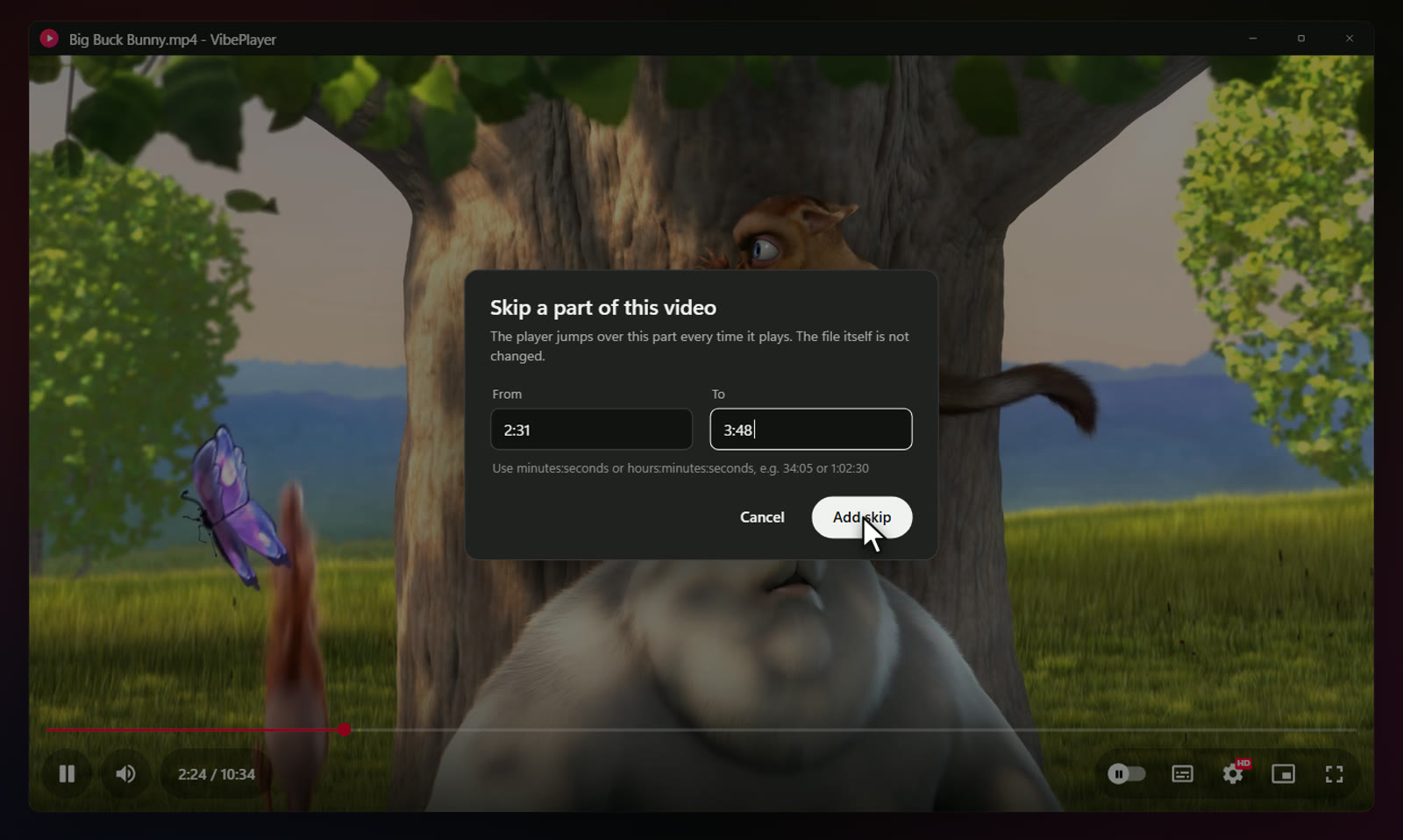
A free media player for Windows on the VLC engine, with a YouTube-style interface. Mark the parts of a video you don't want to see, and it jumps over them every time, without changing the file.
VERSION 1.0.2RELEASED FREE
Other Windows versions and checksumsWindows 7 SP1, 8.1, 10 & 11 · x64, ARM64 and 32-bit
How often the player looks for a marked part while a video plays
47 video and 34 audio formats, plus subtitle files
Every installer.
Pick yours.
| Windows | Best for | Size | Installer |
|---|---|---|---|
| Windows 10 & 11 · 64-bit | Intel or AMD processor. Most PCs. Self-contained. Nothing else to install. | 67.1 MB | Download |
| Windows 11 & 10 on ARM | Snapdragon laptops, Surface Pro X and other ARM PCs. Self-contained. Nothing else to install. | 58.2 MB | Download |
| Windows 10 · 32-bit | Older PCs running a 32-bit installation of Windows 10. Self-contained. Nothing else to install. | 62.2 MB | Download |
| Windows 7 SP1 & 8.1 | Older PCs, 32- or 64-bit. Uses Microsoft .NET Framework 4.8 (setup tells you if it is missing). Installs the 32- or 64-bit VLC engine that matches Windows. | 45.4 MB | Download |
SHA-256 checksums
- VibePlayer-Setup-1.0.2-x64.exe
5b11d72ea2957148c85a424f680ba6822da3fd2287512ce9a15b185532a5b1a4 - VibePlayer-Setup-1.0.2-arm64.exe
c28b2d8bc4846030a94470633041467df1a2207473a9970d6b1396829305d414 - VibePlayer-Setup-1.0.2-x86.exe
ad5963c240599f407c62a63cfb09a7bec35d1211b9552c611ca3326bffb2744a - VibePlayer-Setup-1.0.2-win7-8.exe
9dbab58062fbb6f0a75670719696eb1c3f9c2b960a60c4b75df0b97efd73648a
Which one do I need?
Open Settings › System › About on Windows 10 or 11, or Control Panel › System on Windows 7 and 8.1. It shows your Windows edition and system type. Most PCs need the first installer. Windows 8 needs the free update to 8.1 first. Windows XP and Vista aren't supported.
What it
runs on.
- Windows 10 & 11
- x64 or ARM64, plus 32-bit Windows 10. Self-contained: nothing else to install. Each installer carries the VLC engine for its processor.
- Windows 7 SP1 & 8.1
- 32- or 64-bit. Uses Microsoft .NET Framework 4.8. If it’s missing, setup tells you and offers to open Microsoft’s download page. Setup installs the 32- or 64-bit VLC engine that matches Windows.
- Windows 8
- Needs the free update to Windows 8.1 first.
- Windows XP & Vista
- Not supported. VibePlayer needs Windows 7 Service Pack 1 or newer.
- Installation
- For all users (the default; needs administrator permission) or only for you (no administrator rights needed).
I ran the 64-bit, 32-bit and Windows 7/8.1 (.NET Framework) builds on my Windows 11 PC, playing video, and installed and uninstalled the Windows 7/8.1 edition silently. The ARM64 edition is built natively for ARM, but I haven't run it on ARM hardware yet, and it ships without VLC's prebuilt plugin cache, so it starts a little slower. I haven't run any build on an actual Windows 7 or 8.1 machine.
Skip what you
don't want to see.
- 01
Skip mode
Mark the parts you don’t want to see, by typing the times or pressing [ and ] while you watch. They show in amber on the progress bar and are skipped every time that file plays. The file itself is never changed.
- 02
Hold for 2x
Press and hold the right side of the video, or hold the right mouse button, to play at double speed. Let go to return to your speed.
- 03
A familiar player
A YouTube-style interface: red progress bar with hover time, pill buttons, autoplay, captions, miniplayer and full screen, and the keyboard shortcuts you already know.
- 04
One tidy menu
Loop, playback speed, subtitles, audio track, aspect ratio, brightness, skip scenes, snapshots and updates, all in the settings menu.
- 05
Plays almost anything
47 video and 34 audio file types through LibVLC, the engine inside VLC. Drop a subtitle file on a video to add it, or open a network stream.
- 06
Picks up where you left off
Long videos resume where you stopped. Recent files wait on the start screen, and the rest of the folder plays next.
- 07
Keeps itself up to date
From version 1.0.2, VibePlayer checks this site for a new version about 10 seconds after it starts, then at most once a day. If there is one, a small card offers it, never over a full-screen video that is playing. Update now downloads the installer for your edition, checks its SHA-256 checksum, installs it and starts the player again. Switch it off in Settings › Updates.
Easy to install.
Easy to remove.
- Download the installer for your PC. Use the recommended download above, or pick one from the list.
- Open it. The installers aren't code-signed yet, so Windows SmartScreen may show “Windows protected your PC”. Choose More info, then Run anyway. Compare the SHA-256 checksum first if you'd like to be sure the file is the one I published.
- Choose who it's for. All users is the default and needs administrator permission; only for you needs no administrator rights.
- Pick the extras. A desktop icon, VibePlayer in Open with for video and audio files, and Play with VibePlayer on the folder right-click menu.
To make VibePlayer your default player, right-click a video, choose Open with › Choose another app › VibePlayer and tick Always. Installing a newer version, or another edition, replaces the one you have and keeps your settings.
From version 1.0.2 you won't need to do that by hand. VibePlayer looks for a new version shortly after it starts and at most once a day, and Update now installs it over the one you have, then starts the player again. If it's installed for all users, Windows asks for permission first. The check only downloads a small file from this site, https://www.nomanshafiq.com/updates/vibeplayer.json, with an ordinary web request; nothing about you or your videos is sent. You can turn it off, or check yourself, in Settings › Updates. Versions 1.0.0 and 1.0.1 don't have the updater, so install 1.0.2 over them once.
To remove VibePlayer, uninstall it from Settings › Apps. Your settings, resume positions and skips stay in %APPDATA%\VibePlayer in case you come back.
Curious how
it works?
I wrote about why I built VibePlayer, how skip mode works, and what it took to run one player on every Windows from 7 to 11. There's an interactive demo of skip mode, too.
VibePlayer uses LibVLC, the open-source engine of the VLC project, under the LGPL. It is not affiliated with or endorsed by VideoLAN. The image above is a recreation of the app's interface, not a screenshot.